


Download Copio lo nuevo – Free File Manager for Windows Backup & Data Security
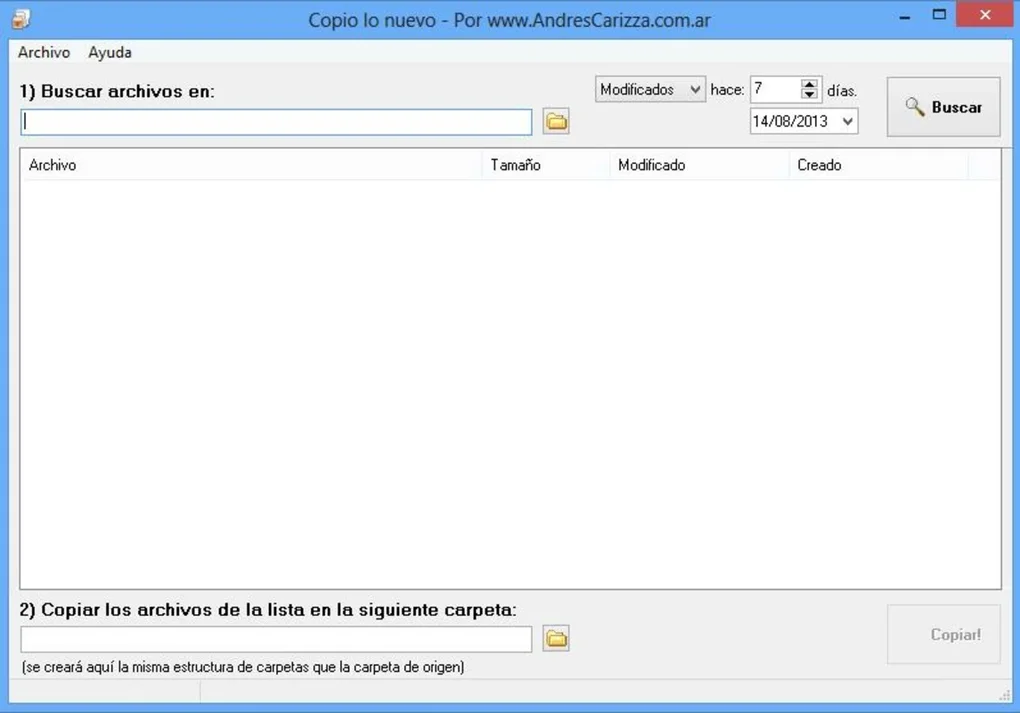
Copio lo nuevo is a powerful and lightweight file management tool designed for Windows users who want to streamline their backup workflows. This free software simplifies the process of identifying and copying only the files that have been modified after a specific date, ensuring that your backups are both efficient and up to date. With its intuitive interface and smart filtering system, Copio lo nuevo helps you recreate an exact folder structure at a destination location, preserving your original organization.
Whether you're backing up personal documents, project files, or critical business data, this tool ensures that only updated files are transferred—saving time, bandwidth, and storage space. The software is ideal for users who need regular backups without the complexity of full system imaging or third-party backup solutions. Its focus on file modification dates makes it a reliable choice for maintaining data integrity and preventing data loss.
With easy setup, secure file handling, and a minimal system footprint, Copio lo nuevo stands out as a must-have utility for anyone serious about digital organization and data protection.
Key Features of Copio lo nuevo – Smart File Backup Made Simple
One of the standout features of Copio lo nuevo is its ability to scan and filter files based on their last modified date. This means you don’t have to manually search through folders to find what’s new—just set a date threshold, and the software automatically identifies and copies only the updated files. This is especially useful for users who perform weekly or monthly backups and want to avoid redundant transfers of unchanged documents. The tool maintains the original folder hierarchy at the destination, so your backed-up data remains organized exactly as it was in the source. This feature is a game-changer for professionals managing large project folders, such as designers, developers, or content creators, who need to preserve file structure across versions.
Another powerful functionality is the customizable destination path. You can choose any folder on your local drive, external storage, or even a network location as the backup target. This flexibility ensures that your data can be stored securely in multiple locations, enhancing redundancy. The software also includes a real-time preview feature that shows which files will be copied before the process starts, giving you full control and transparency. Additionally, Copio lo nuevo supports batch processing, allowing you to set up multiple backup tasks with different source and destination paths, saving time for users managing several projects simultaneously.
Security is built into the core of the application. All file operations are performed locally, with no data sent to external servers, ensuring privacy and compliance with data protection standards. The tool also includes a log history feature that records each backup session, including timestamps, file counts, and any errors encountered. This makes troubleshooting simple and provides a reliable audit trail for critical data management. Whether you're a home user safeguarding family photos or a small business owner protecting client files, Copio lo nuevo delivers peace of mind with every backup.
How to Install and Use Copio lo nuevo – Step-by-Step Guide
Installing Copio lo nuevo is a quick and hassle-free process. Begin by visiting the official download page and selecting the Windows installer file. The executable is lightweight (under 10MB) and does not require administrative rights for installation, making it accessible even on restricted workstations. Once downloaded, run the installer and follow the on-screen prompts. The setup wizard guides you through the process in just a few clicks, with no need to configure advanced settings during installation.
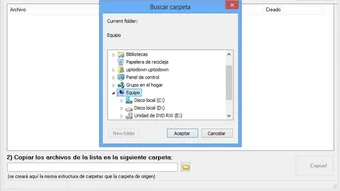
After installation, launch the application. The main interface is clean and user-friendly, featuring two primary input fields: one for selecting the source folder and another for defining the destination. You can browse your system using the built-in file explorer or drag and drop folders directly into the fields. Next, set the date filter—choose a specific date or use the “last 7 days” option to capture recent changes. You can also enable the “include subfolders” option to ensure all nested files are scanned.
Once configured, click the “Start Backup” button. The software will begin scanning and copying only the files modified after the specified date. A progress bar and real-time counter show the number of files processed, and a success message appears upon completion. For advanced users, the tool allows saving backup profiles, so you can quickly reload your preferred settings for recurring tasks. You can also schedule backups using Windows Task Scheduler, though the app itself doesn’t include native scheduling—this is a minor limitation but easily overcome with external tools.
Compatibility and System Requirements
Copio lo nuevo is fully compatible with all modern versions of Windows, including Windows 10, Windows 11, and Windows Server editions. It runs smoothly on both 32-bit and 64-bit systems, ensuring broad accessibility across personal and enterprise environments. The software has minimal system requirements, needing only a few hundred megabytes of free disk space and a standard x86 or x64 processor. It does not require additional runtime libraries or .NET frameworks, which means it installs and runs without dependency conflicts.
While Copio lo nuevo is currently only available for Windows, its core functionality—date-based file filtering and folder structure replication—can be emulated on other platforms with third-party tools, though none match its simplicity. The absence of native Mac, Android, or iOS versions is a notable gap for users in multi-platform environments. However, for Windows-centric workflows, this software is a standout choice. It works seamlessly with external drives, USB flash drives, and network shares, making it ideal for portable backup solutions. Users with large file collections will appreciate its efficient memory usage and low CPU impact during operations.
For those concerned about security, the software operates entirely offline and does not collect or transmit any user data. This makes it suitable for use in regulated industries such as healthcare, finance, or legal services where data privacy is paramount. The application is also compatible with encrypted drives and folders, provided the user has the necessary permissions. Overall, Copio lo nuevo delivers excellent cross-system compatibility within its supported platform, making it a reliable tool for everyday backup needs.
Pros and Cons of Copio lo nuevo – Honest Review
- Pros:
- Efficient date-based file filtering reduces backup time and storage usage
- Preserves original folder structure at the destination
- Lightweight, fast, and runs without high system resource consumption
- Free to download and use with no hidden fees or ads
- Secure and private—no data is uploaded or shared
- Simple, intuitive interface suitable for beginners and experts alike
- Includes log history for backup tracking and troubleshooting
- Cons:
- Limited to Windows only—no Mac, iOS, or Android support
- No built-in scheduling feature (requires external tools)
- Advanced users may desire more customization options (e.g., file type filters)
- Small learning curve for users unfamiliar with backup workflows
- Does not support cloud backup destinations directly
Frequently Asked Questions (FAQ)
- Is Copio lo nuevo free to download and use?
Yes, Copio lo nuevo is completely free to download and use with no trial limitations, subscription fees, or in-app purchases. The software remains ad-free and does not collect user data.
- Can I use Copio lo nuevo to back up my entire hard drive?
While the software can back up large folders, it’s not designed for full system backups. It’s best suited for specific folders like documents, projects, or media libraries. For full system imaging, consider dedicated tools like Macrium Reflect or Acronis.
- Does Copio lo nuevo support backup to external drives or network locations?
Absolutely. You can set the destination to any local drive, external USB drive, or mapped network folder. The software handles permissions and paths automatically, making it ideal for portable backups.
- Can I schedule automatic backups with Copio lo nuevo?
Not directly within the app. However, you can integrate it with Windows Task Scheduler to run backups at set intervals. This workaround is simple and effective for users who want automation.
- Is my data safe when using Copio lo nuevo?
Yes. All file operations occur locally on your machine. No data is sent to servers or third parties. The software respects your privacy and is ideal for sensitive or confidential files.
- Does Copio lo nuevo work with encrypted folders?
Yes, as long as you have the proper permissions to access the encrypted files. The software does not decrypt files but can copy them if the system allows access.
Final Verdict: Is Copio lo nuevo Worth Downloading?
After thorough testing, Copio lo nuevo proves to be an excellent choice for Windows users seeking a fast, secure, and free file backup solution. Its core strength lies in its simplicity and efficiency—filtering only modified files and preserving folder structure without clutter. While it lacks native scheduling and cross-platform support, these limitations are outweighed by its reliability, performance, and privacy-first design.
Whether you're a student managing research papers, a freelancer handling client projects, or a small business owner protecting important records, Copio lo nuevo delivers real value. It’s a lightweight yet powerful tool that fills a niche often overlooked by more complex backup suites.
Download Copio lo nuevo today and take control of your data with confidence. Protect your files, save time, and ensure peace of mind with every backup.







